Use Graphify with OpenCode for Persistent Codebase Memory
On this page
If you use AI coding agents every day, you've probably seen this pattern:
- new session starts
- agent has no memory of repo architecture
- it re-reads files and burns tokens rediscovering context
Graphify + OpenCode is a practical fix.
Graphify creates a queryable knowledge graph from your repo and related docs. OpenCode gives you a fast terminal-native coding workflow. Combined, they let your agent reason from structure first instead of repeated text search.
What you get
- Better context reuse across sessions
- More focused code navigation and impact analysis
- Less repeated “exploration slop” and token waste
- Cleaner team handoffs when graph artifacts are shared
What it looks like
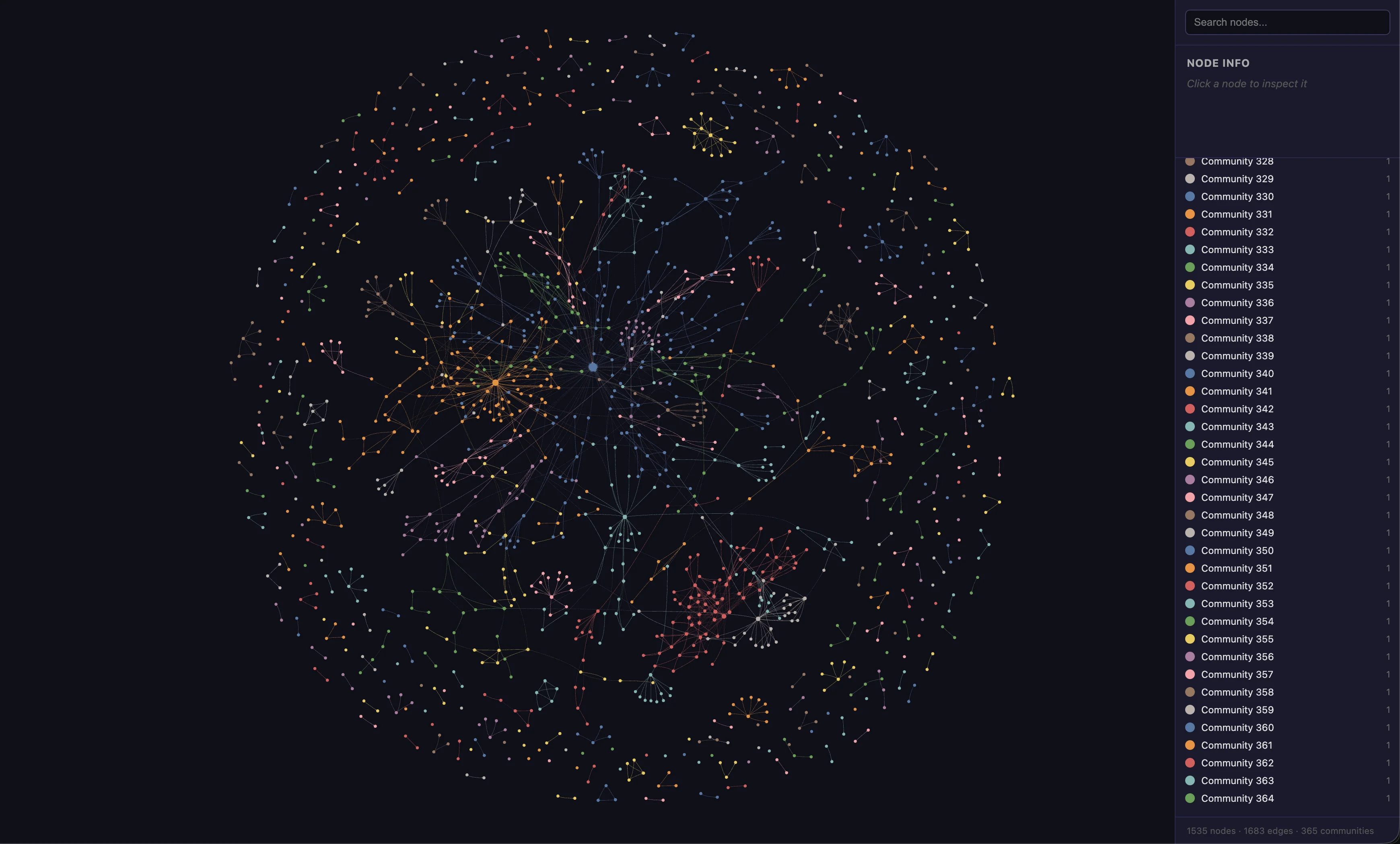
A generated Graphify graph for a real codebase. Nodes are files and symbols; edges are imports, calls, and relationships. Communities surface architectural clusters automatically.
Core setup
# Install Graphify
pip install graphifyy

# Install OpenCode (example)
brew install opencode

# Install Graphify integration for OpenCode
graphify install --platform opencode

# Build graph from your project root
/graphify .
Practical workflow loop
- Start with Graphify report output (
GRAPH_REPORT.md) - Query graph for scoped architectural context
- Plan/build in OpenCode with graph-informed understanding
- Refresh graph after meaningful code changes
This shifts your workflow from “search everything every time” to “query the right structures first.”
Example: querying authentication flow
Here is a sanitized example of querying a real codebase for its auth architecture. All proprietary names, internal APIs, and business-specific routes have been replaced with generic equivalents.
The query
$ graphify query "show the auth flow" --graph graphify-out/graph.json
Graph results (selected nodes)
NODE use-auth.ts           [src=hooks/use-auth.ts loc=L1 community=97]
NODE auth-guard.tsx        [src=components/auth/auth-guard.tsx loc=L1 community=97]
NODE sign-in/page.tsx      [src=app/(public)/sign-in/page.tsx loc=L1 community=42]
NODE sign-in-form.tsx      [src=components/auth/sign-in-form.tsx loc=L1 community=42]
NODE phone-login.tsx       [src=components/auth/phone-login.tsx loc=L1 community=42]
NODE email-login.tsx       [src=components/auth/email-login.tsx loc=L1 community=42]
NODE social-login.tsx      [src=components/auth/social-login.tsx loc=L1 community=42]
NODE verify-otp.tsx        [src=components/auth/verify-otp.tsx loc=L1 community=42]
NODE create-profile.tsx    [src=components/auth/create-profile.tsx loc=L1 community=42]
NODE link-phone.tsx        [src=components/auth/link-phone.tsx loc=L1 community=42]
NODE api-client.ts         [src=lib/api-client.ts loc=L1 community=12]
NODE user-store.ts         [src=stores/user-store.ts loc=L1 community=97]
Interpreted flow
-
Route guard —
useAuth()+auth-guard.tsx- Checks current path against a
REQUIRED_AUTH_PAGESlist - If no session token and the page is protected, blocks access
- Also defers rendering while user profile is being fetched
- Checks current path against a
-
Sign-in entry point —
sign-in/page.tsx- Renders the main sign-in shell
- If already authenticated, redirects to the original destination or home
-
Method selection —
sign-in-form.tsx- Presents available login methods based on tenant configuration
- Phone, Email, or Social (Google, Apple, etc.)
-
Phone login flow
- Collects phone number → submits to backend OTP endpoint
- Backend dispatches OTP via SMS or third-party provider
- User enters OTP in
verify-otp.tsx - New users are sent to
create-profile.tsxto complete onboarding - Success: persists access token and hydrates user store
-
Email login flow
- Validates email format → submits to same OTP endpoint with email method
- Verifies OTP from inbox → may require phone linking for account recovery
- New users → profile creation → token persisted → store updated
-
Social login flow
- Uses OAuth popups/redirects via provider SDKs
- On success, calls the backend sign-in endpoint with social payload
- If the tenant requires a phone number and the account lacks one, prompts to link via
link-phone.tsx - Otherwise, stores token and updates state directly
Why this matters
Without the graph, an AI agent would need to grep for "auth", open a dozen files, and slowly reconstruct this sequence. With Graphify, the architecture is queryable in seconds — the communities even cluster the guard logic (community 97), the public pages (community 42), and the API layer (community 12) automatically.
Team usage notes
For teams, treat graph outputs like build artifacts:
- generate in CI or by one designated maintainer
- share the canonical graph outputs
- avoid everyone producing diverging local semantic layers
Caveats
- first-time graph generation can be non-trivial on larger repos
- semantic extraction quality depends on source quality and project structure
- refresh cadence matters; stale graph data can mislead architectural queries
Final take
OpenCode gives speed; Graphify adds memory.
If you’re doing serious AI-assisted development, this combination is one of the highest-leverage upgrades you can make: less context churn, better architectural reasoning, and a more stable coding loop.